Sunday, June 16, 2013

Have a Shark Encounter... safely

My Paper, Friday, June 14, 2013, Page A6, News
By Felicia Choo, feliciac@sph.com.sg, My Paper, Friday, Jun 14, 2013
 

Up close and pesonal: The writer (right) admires a hammerhead shark at Marine Park's Shark Encounter, which will allow visitors to spend 15 minutes underwater gawking at ocean predators.
PHOTO: Up close and pesonal: The writer (right) admires a hammerhead shark at Marine Park's Shark Encounter, which will allow visitors to spend 15 minutes underwater gawking at ocean predators.
Photo by Ong Wee Jin / My Paper
https://blogger.googleusercontent.com/img/b/R29vZ2xl/AVvXsEgcOF1SX5NKlC9HjTmcF3V3COzk4_j-vBugdrbl5yfVgs-VHcS39zUiCNcZzFtfMwCc2SzIfMlUjcIwq6w71uQtTmCbMgPF2Rrr_XyzQKfVh32vGi3EOqSze53aEA7AJ7jz9mr56kXU8jK-/s1600/Have+a+Shark+Encounter...+safely.jpg
My Paper, Friday, June 14, 2013, Page A6, News


Inches away from my face, a hammerhead shark bared its rows of menacing teeth and tore away at a hapless fish.

I remained unharmed in those few moments, peering from the safety of an acrylic enclosure underwater, where I was given a 360-degree view some 200 sharks of 10 species.

The media was yesterday given a preview of what visitors can expect at the Marine Life Park's newest attraction, Shark Encounter, which opens to the public tomorrow.

For $88, visitors aged 12 and above can spend 15 minutes underwater up close and personal with ocean predators, such as hammerhead sharks, nurse sharks and black-tip sharks. A maximum of two participants is allowed in each session.


 For $88, visitors aged 12 and above can spend 15 minutes underwater up close and personal with ocean predators, such as hammerhead sharks, nurse sharks and black-tip sharks.
PHOTO: For $88, visitors aged 12 and above can spend 15 minutes underwater up close and personal with ocean predators, such as hammerhead sharks, nurse sharks and black-tip sharks.
Photo by Ong Wee Jin / My Paper
https://blogger.googleusercontent.com/img/b/R29vZ2xl/AVvXsEjTv4CLkRF-_OiyV2sJjrasPbdrkrtEz-ZlDTalb0TFsz6zZ8Pzj1FsysQGVSyu2yofUScFXXEWzl1aSJnZdyrjWzdTxXb-fgH14A2kkVH3IIVcMzDcNR0h16vZCTth09jt_x26tkLQTRjB/s1600/Have+a+Shark+Encounter...+safely-1.jpg
My Paper, Friday, June 14, 2013, Page A6, News


Another attraction at the park, called Sea Trek Adventure, will be opened to the public on June 30. It will see visitors don air-filled helmets and wetsuits before they descend 3m into the 18.2-million-litre aquarium.

Once on the aquarium floor, they can walk about and be treated to a panoramic view of 50,000 fishes of more than 80 species.

It will cost each participant $238 for a 20-minute underwater session, with a maximum of five participants allowed per session.

But, unlike Shark Encounter, visitors do not need to know how to swim to experience the Sea Trek Adventure.


Visitors need to know how to swim to experience the Shark Fantasy
PHOTO: Visitors need to know how to swim to experience the Shark Fantasy
https://blogger.googleusercontent.com/img/b/R29vZ2xl/AVvXsEidVbRqx-Bueq6twcjn4Tz_5xWsI-ZIxCJ9ZPxcsZ7QjuuHHcvv8MMlBzeli2kQVRQZQM0Ud_EfwlVTFPQtP8s3TZDMpbKL2m0pUiTrQvUxJfXNPlbcfImsSn4sAasqtYB9EmCkMfOPAA5z/s1600/sharknight-2.jpg
https://blogger.googleusercontent.com/img/b/R29vZ2xl/AVvXsEh-RlNKgGYATpVrbIWip-bwuKVOYOFTRu1uWd7PjY9kuhIrIZBb0PKx1wAmHm7mnnPGqcIy2zgxrUMQYZYzpiIJhks7rMe2KVZkXPGuwFqpY8gkBCHRKIYiyhoOY9QntemKTX_fCDF_Bi5L/s1600/sharknight-2-1.png
http://electroshadow.com/wp-content/uploads/2011/07/sharknight-2.jpg
http://euesports.com/forum/index.php?threads/sharks-avatar-and-sig.41756/


The Marine Life Park at Resorts World Sentosa opened its gates to visitors last November.

Its oceanarium is billed as the world's largest, with 100,000 animals spread over 8ha.

Visitors can look forward to even more sharks in the future, said the park's senior curator, Mr Grant Willis, 41.

He said: "We do have a lot of sharks that are breeding already (and) we have eggs that are hatching...

"What we're looking at now is to get pairs (of male and female sharks) and we are looking at having breeding groups of all the different species."

By Felicia Choo, feliciac@sph.com.sg, My Paper, Friday, Jun 14, 2013

How to Search Google Like a Pro: 11 Tricks You Have to Know

Source Website: http://www.howtogeek.com/106718/how-to-search-google-like-a-pro-11-tricks-you-have-to-know/
By Chris Hoffman, Published 27 Feb 2012


Google header
PHOTO: Google header
https://blogger.googleusercontent.com/img/b/R29vZ2xl/AVvXsEiONCc80jlsBlwrvDliAgQ-UY5ejxxnrP4d2EUPNyeRnJRW95tn2fM7sFAYu6jQHjGtBog-iRPlzS75Oxowf95fonNzLYQ2kFJPvqia1ltjYrhMHJqntL41mNUl0WbTRCBKkKpMLUtMmAYr/s1600/google-header.png
http://cdn.howtogeek.com/wp-content/uploads/2012/02/google-header.png
http://www.howtogeek.com/106718/how-to-search-google-like-a-pro-11-tricks-you-have-to-know/


Google is a powerful tool, but you’re missing out on a lot of that power if you just type words into it. Master Google and find the best results faster with these search tricks.

Whether you’re an inexperienced user or a seasoned professional, you’ll probably find at least one search operator you weren’t aware of here. Many of Google’s search operators aren’t very well-known.


Exact Words and Phrases
One of the most basic and widely known search tricks is using quotation marks to search for an exact phrase. For example, perform the following search and you’ll only get pages that contain the word “Hello” followed by the word “World.”

“Hello World”


Quotation mark for Exact Words and Phrases
PHOTO: Quotation mark for Exact Words and Phrases - example, “Hello World” screenshot
https://blogger.googleusercontent.com/img/b/R29vZ2xl/AVvXsEiweF0N7WxJzetk3hM7z8iaRwuGBkPzMg_eppHQS5EN1cDIm7Cxq-C22ApUjQff-uLhHYS7l3fcnd4L875nMD193mO40MtwqYpvtZ_Nh3Ek1JLOSg4oOTKMVBAGC4CDCvi-y3AY2uXNyz1O/s1600/screenshot_0114.png
http://cdn.howtogeek.com/wp-content/uploads/2012/02/screenshot_0114.png
http://www.howtogeek.com/106718/how-to-search-google-like-a-pro-11-tricks-you-have-to-know/


This same method now works for exact-word queries. For example, if you search for “mining,” Google will also show pages that contain the words “miners.” Previously, you’d use a plus sign and search for +mining, but now you have to enclose the word in quotes:

“mining”


Excluding a Word
The minus sign allows you to specify words that shouldn’t appear in your results. For example, if you’re looking for pages about Linux distributions that don’t mention Ubuntu, use the following search:

linux distributions -ubuntu


Minus sign for excluding a Word - example, linux distributions -ubuntu - Screenshot
PHOTO: Minus sign for excluding a Word - example, linux distributions -ubuntu - Screenshot
https://blogger.googleusercontent.com/img/b/R29vZ2xl/AVvXsEhtAgUNFOUtIE5bInW-Svzg786EvM63bl3gFhEs6Cf-BcwcgR7OOHtckjc3v1mFGDZn1hxtGpFQmOzXGt24NI8VPVTBwfKnVHw3vvxYTKNBsemBXw0H9zT-liDznjlPRLG00GAonfuQ6Ngp/s1600/screenshot_0213.png
http://cdn.howtogeek.com/wp-content/uploads/2012/02/screenshot_0213.png
http://www.howtogeek.com/106718/how-to-search-google-like-a-pro-11-tricks-you-have-to-know/


Site Search

The site: operator allows you to perform a search in a specific site. Let’s say you’re looking for information on Windows 7 on How-To Geek. You could use the following search

site:howtogeek.com windows 7


The site: operator for Site Search - example, site:howtogeek.com windows 7
PHOTO: The site: operator for Site Search - example, site:howtogeek.com windows 7
https://blogger.googleusercontent.com/img/b/R29vZ2xl/AVvXsEh01ZJ536VyEB7lvxxOQTlJuP1R-ygRpi1zthDsVV2mIWg_8Ap9QmtisrafLnGojCFRsc8qv04p_Q72w7pdxH-H1uQQoVpmAeZiLxUNlb3wkTZToKVONqtHXmKuFAfcMVntq7NDt2TP4n9t/s1600/screenshot_0313.png
http://cdn.howtogeek.com/wp-content/uploads/2012/02/screenshot_0313.png
http://www.howtogeek.com/106718/how-to-search-google-like-a-pro-11-tricks-you-have-to-know/


You can also use the site: operator to specify a domain. For example, if you’re looking for high-quality references, you could use site:.edu to only pull up results from .edu domains.


Related Words
The tilde (~) operator is the opposite of enclosing a single word in quotes — it searches for related words, not just the word you type. For example, if you ran the following search, you’d find search results with words similar to “geek”:

~geek


The tilde (~) operator for searching related words - example, ~geek
PHOTO: The tilde (~) operator for searching related words - example, ~geek
https://blogger.googleusercontent.com/img/b/R29vZ2xl/AVvXsEhujVphfihTItN5Hun9tq0SxXCv_4bwqKNoinRxdOt3EVIzs9o5pQ-eN9hWE0YTM8Q-H__oMEhhUB7DjGflMjGWI-m8gYjoq76femKy1rHBu9TkbTXAwvStTQu5W-icmP-QNGGFLZ2EbHG1/s1600/screenshot_0412.png
http://cdn.howtogeek.com/wp-content/uploads/2012/02/screenshot_0412.png
http://www.howtogeek.com/106718/how-to-search-google-like-a-pro-11-tricks-you-have-to-know/


Apparently, “Linux” is the most similar word to geek, followed by “Greek.” “Nerd” comes in third. (Hey, no one ever said Google was perfect.)


The Wildcard
The asterisk (*) is a wildcard that can match any word. For example, if you wanted to see what companies Google has purchased and how much they paid, you could use this search:

“google purchased * for * dollars”


 The asterisk (*) wildcard that can match any word - example, 'google purchased * for * dollars' PHOTO: The asterisk (*) wildcard that can match any word - example, “google purchased * for * dollars”
https://blogger.googleusercontent.com/img/b/R29vZ2xl/AVvXsEitH8FmjD3iWBjfpbw-U5tQCkvJrhiwAN9cVaJYmZFcUBMRFRbc0cemeHznQcYrBzFGQwRC5HPSAiT3DpKVxhc00LZnnzjxkYnBoKj2KmUsFabjhhk1dcXaw7KGdsVARQC75uzCFZNvzdUm/s1600/screenshot_0512.png
http://cdn.howtogeek.com/wp-content/uploads/2012/02/screenshot_0512.png
http://www.howtogeek.com/106718/how-to-search-google-like-a-pro-11-tricks-you-have-to-know/


Time Ranges
A little-known search operator allows you to specify a specific time range. For example, use the following search to find results about Ubuntu from between 2008 and 2010:

ubuntu 2008..2010


Time Ranges operator for specifying a specific time range - example, ubuntu 2008..2010 PHOTO: Time Ranges operator for specifying a specific time range - example, ubuntu 2008..2010
https://blogger.googleusercontent.com/img/b/R29vZ2xl/AVvXsEirRZ4eyLKfh8JtCW-RntX1XLQoFq5-G3UsPKfZniYaEij54nvR_r-bNl6sMoqwy5HBLsyuNymde_QbqG6MuWO76t2Pa8HQXX_QynAKknzUkjAaozSCLlI66qs8_xFibos6e-diVEsBXeaS/s1600/screenshot_0611.png
http://cdn.howtogeek.com/wp-content/uploads/2012/02/screenshot_0611.png
http://www.howtogeek.com/106718/how-to-search-google-like-a-pro-11-tricks-you-have-to-know/


File Type
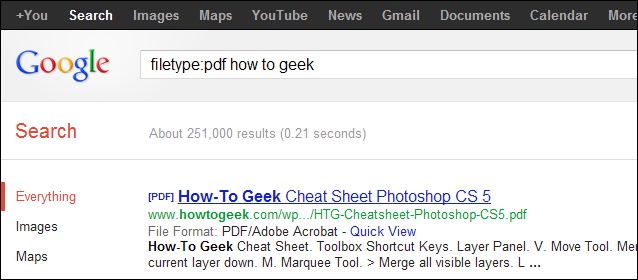
The filetype: operator lets you search for files of a specific file type. For example, you could search for only PDF files.

filetype:pdf how to geek


The filetype: operator searches for files of a specific file type - example, filetype:pdf how to geek
PHOTO: The filetype: operator searches for files of a specific file type - example, filetype:pdf how to geek
https://blogger.googleusercontent.com/img/b/R29vZ2xl/AVvXsEiHGYh_GwFpfFvZ_3KCtdALhMa7kfwgsvIbbRlhLO2xcjk0eadIk6qhkPtoLAvFFQ1CO3-y8UICA4pRfZLQql2Bk44yem38lr4QMsVYI7uAKj79JItu2lXZS72qIyZgvOGQdxCmTHtRwXHK/s1600/screenshot_079.png
http://cdn.howtogeek.com/wp-content/uploads/2012/02/screenshot_079.png
http://www.howtogeek.com/106718/how-to-search-google-like-a-pro-11-tricks-you-have-to-know/


One Word or the Other
The “OR” operator lets you find words that contain one term or another. For example, using the following search will pull up results that contain either the word “Ubuntu” or the word “Linux.” The word “OR” must be in uppercase.

ubuntu OR linux


The 'OR' operator to find words that contain one term or another - example, ubuntu OR linux
PHOTO: The “OR” operator to find words that contain one term or another - example, ubuntu OR linux
https://blogger.googleusercontent.com/img/b/R29vZ2xl/AVvXsEhoEjqEA8Rbb4OIVrTpi3gk-nBj9cVgr6P9yB7OENTq4xtdxvit0oSIvCXBOJQDnhMWrByddkIEe0nbgdLWxWRvbXU6FVPqiAzZgM8530fhWGTnUwlY_8Qa6Ce8dByTDVjUalTbRvA4Y4o4/s1600/screenshot_0811.png
http://cdn.howtogeek.com/wp-content/uploads/2012/02/screenshot_0811.png
http://www.howtogeek.com/106718/how-to-search-google-like-a-pro-11-tricks-you-have-to-know/


Word Definitions
You don’t have to Google a word and look for a dictionary link if you want to see its definition. Use the following search trick and you’ll see an inline definition:

define:word


The define: operator to see the word's definition - example, define:word
PHOTO: The define: operator to see the word's definition - example, define:word
https://blogger.googleusercontent.com/img/b/R29vZ2xl/AVvXsEjvVb0c8G6MCDNQ7HMNTa0T5cW_8yJdWQ8Y2pdyXZojqzI4AdeF_G1sPiEMbIJpXdoKLG-eK4VkSfxrge5vb_JA7lZyuuUHFcai6aE8Dfsw_tSmPsEwMbEZD-HygJ5mCQdLJXv8l0d_roPn/s1600/screenshot_098.png
http://cdn.howtogeek.com/wp-content/uploads/2012/02/screenshot_098.png
http://www.howtogeek.com/106718/how-to-search-google-like-a-pro-11-tricks-you-have-to-know/


Calculator
Use Google instead of pulling one out or launching a calculator app. Use the +, -, * and / symbols to specify arithmetic operations. You can also use brackets for more complicated expressions. Here’s an example:

(4 + 2) * (6 / 3)


The +, -, * and / symbols (arithmetic operator) to specify arithmetic operations - example: (4 + 2) * (6 / 3)
PHOTO: The +, -, * and / symbols (arithmetic operator) to specify arithmetic operations - example: (4 + 2) * (6 / 3)
https://blogger.googleusercontent.com/img/b/R29vZ2xl/AVvXsEjL2VZ3AuV_-hJxT_Y4bLcQJZRIRvjBes-ke6QPiAGofZYPLwzdPzsBi9oc_d0_6W_kQa5X644aE5ULLWv_e3a-m7PzHVtZNG0XKAt7GtZ0KrxnwSd-W49Wt1LvKhjctm4hH315f-sY37KS/s1600/screenshot_109.png
http://cdn.howtogeek.com/wp-content/uploads/2012/02/screenshot_109.png
http://www.howtogeek.com/106718/how-to-search-google-like-a-pro-11-tricks-you-have-to-know/


Unit Conversions
The calculator can also convert between units. Just type “X [units] in [units]”. Here’s an example:

5 nautical miles in kilometers

 
Unit Conversions 'X [units] in [units]' - example, 5 nautical miles in kilometers
PHOTO: Unit Conversions “X [units] in [units]” - example, 5 nautical miles in kilometers
https://blogger.googleusercontent.com/img/b/R29vZ2xl/AVvXsEhQKLCLcGL36wFLcbYtcI5Bkv9PxrCI9GqAnn_BJ5XA5rSZ7PXLOMN9GgQq6M7lkQCmTAilGdtp4sU6CowkqujRKa5q_VBavRCJolld-Ab5Wwqp0wfIari8HUU60GCez7w8IrbiS5sr-JTb/s1600/screenshot_1110.png
http://cdn.howtogeek.com/wp-content/uploads/2012/02/screenshot_1110.png
http://www.howtogeek.com/106718/how-to-search-google-like-a-pro-11-tricks-you-have-to-know/


Exercise:
Combine these search operators to create more complex queries. Want to search a specific website for a PDF file, created between 2001 and 2003, that contains a specific phrase but not another phrase? Go ahead.

filetype:pdf 2001..2003 "Google"
-ubuntu

Exercise - filetype:pdf 2001..2003 'Google' -ubuntu
PHOTO: Exercise - filetype:pdf 2001..2003 "Google" -ubuntu
https://blogger.googleusercontent.com/img/b/R29vZ2xl/AVvXsEjtLlXazinXeYpI2v_y4ilibpggoSQoeLPd2wPNJCJnwQNMF5K7pgYvQwohjVsGxpwMTv44a_hvArV6y1bSjRYDpBLdpaYvz-7J6rTLLzD3EPpHiDeqC4ih0vFDltLeOPil2VF255sXree3/s1600/filetype+pdf+2001..2003+%27Google%27+-ubuntu.jpg
 

By Chris Hoffman, Published 27 Feb 2012
Chris Hoffman is a technology writer and all-around computer geek. He's as at home using the Linux terminal as he is digging into the Windows registry. Connect with him on Google+.


Reference

Saturday, June 8, 2013

How To Tether Your Cell Phone Using PdaNet

PHOTO: PdaNet Tethering App
PdaNet Android app for tethering, Logo PdaNet / Screengrab Melanie Pinola
https://blogger.googleusercontent.com/img/b/R29vZ2xl/AVvXsEjCyFzTiUvhvYGQP-9d489nPjE-FsPTHvFdW0TWHtQCdsaYw4QHNSf35oisqY8VYE7DCbqiUwH7ibQBfdynXHGFO0W2AJp6Zhi7ISGYphSUZZQFov-qGfoI1CdXQEY0fu70RuD5GnfMz2QX/s1600/android-pdanet.png
http://0.tqn.com/d/mobileoffice/1/0/G/E/android-pdanet.png
http://mobileoffice.about.com/od/wifimobileconnectivity/ss/how-to-tether-android-phones-with-pdanet-instructions.htm


Tethering with PdaNet: An Overview
PdaNet is a free app (available for iPhone, Android, BlackBerry, and other mobile platforms) that you can use to turn your smartphone into a modem for your laptop. Tethering capabilities mean you'll never have to worry about finding a wi-fi hotspot or be in range of a wireless access point -- as long as you have cellular data coverage (3G/4G), you'll be able to work online on your laptop wherever you are.

The screenshots here use the Android version as an example (Android 2.1 and Windows 7). PdaNet's Android version enables tethering via USB cable as well as over Bluetooth DUN (Dial-Up Networking). Although you can use PdaNet for free, the full version ($23.95) allows you to access secure web sites after the trial period ends.

Next: Download and install PdaNet to your computer


Download and Install PdaNet on Your Mac or PC
PHOTO: Download and Install PdaNet on Your Mac or PC
Install PdaNet on Your Computer, by Melanie Pinola
https://blogger.googleusercontent.com/img/b/R29vZ2xl/AVvXsEjAv2-cZ5gWIFFHMF7peKFQ3kjUWgLJOlJ8oUhJMxMiC2eZRfHQbFBansYzRXYL4nkmxs_4seNLLr9XM4EYmy8MTih9NoNB4zY-UP9iViwZzhzSNBFRdHCExcFUGv210PDbp2hZUAWwVf7A/s1600/pdanet-install-usb-driver.gif
http://0.tqn.com/d/mobileoffice/1/0/E/E/pdanet-install-usb-driver.GIF
http://mobileoffice.about.com/od/wifimobileconnectivity/ss/how-to-tether-android-phones-with-pdanet-instructions_2.htm


Tether Your Android Phone to a Windows or Mac Computer

To use the PdaNet app for tethering your Android phone, you need to install the app on both your Android phone (download it from Android Market) and also install the software on the Windows computer (Windows XP, Vista, Windows 7 -- 32-bit and 64-bit versions available) or Mac OS X (10.5+) computer you want to go online from using your cell phone as the modem. 

Step 1: Download the PdaNet Android Windows or Mac installers from makers June Fabrics.
(Alternately, you can download the installation file to your Android phone's SD card, connect your phone via USB and mount the SD card, and run the installation package from there.)

Step 2: Install PdaNet on Your Computer:
Set up on the computer side is pretty straightforward though there are several steps involved. During the installation you'll be prompted to select your cell phone manufacturer and also connect your device via USB (enable USB debugging on your Android phone in Settings > Applications > Development). 

You may be warned by Windows Security that the publisher of the driver software can't be verified, but just ignore that prompt and choose to "Install this driver software anyway."

Next: Install the PdaNet app on your Android device


 Download and Install PdaNet on Your Cell Phone 
PHOTO: Download and Install PdaNet on Your Cell Phone
Download PdaNet from the Android Market, Screengrab by Melanie Pinola
https://blogger.googleusercontent.com/img/b/R29vZ2xl/AVvXsEgZ6d0tPsi9gCHjY9FveNZ7kUgTtzjbhLBmrg0IcHc0divRWT-_T4x6zIokQDxPijr9QnEgebloDFIgzTa48gfbY9XpGKg9g6mJVe-YBGEvoGX2T0eB-IyPzEhdQFewmjtpU2uJnGRRFwTL/s1600/android-pdanet-market.png
http://0.tqn.com/d/mobileoffice/1/0/H/E/android-pdanet-market.png
http://mobileoffice.about.com/od/wifimobileconnectivity/ss/how-to-tether-android-phones-with-pdanet-instructions_3.htm


Step 3: Download PdaNet to Your Android Smartphone
After installing the PdaNet software for your Windows or Mac laptop/computer, you'll need the app on your Android smartphone. Search for "PdaNet" (not case-sensitive, actually) in the Android Market, and install the app (made by June Fabrics Technology Inc.).

Next: Connect Your Android phone via USB or Bluetooth


Tether Your Android Phone to Your Computer
PHOTO: Tether Your Android Phone to Your Computer
Connect your Android device to your computer to use PdaNet for tethering, by Melanie Pinola
https://blogger.googleusercontent.com/img/b/R29vZ2xl/AVvXsEhHlxmEoMLjkFcMzSWq6orbuUFwzxWruVHuG1tBJNOl6zJKBlnIbRVq6xuhu73-2dEB5-9-vsHfL_0eFejs2uhkpb5PHYyF6MloK6jSPfe1KoWEJUiYiJ__vwl-ypwVM2yQ1qftQk_dPUAP/s1600/tether-pdanet-pop-up.jpg
http://0.tqn.com/d/mobileoffice/1/0/F/E/tether-pdanet-pop-up.jpg
http://mobileoffice.about.com/od/wifimobileconnectivity/ss/how-to-tether-android-phones-with-pdanet-instructions_4.htm


Step 4: Connect Your Android Phone to Your Computer to Share the Internet Connection
Once the software has been installed on both your Android phone and your laptop, you can share your phone's Internet connection with your computer. 

To connect over USB:
  • Go to the PdaNet app on your smartphone and select "Enable USB Tether," then use the USB cable to connect the device to your laptop.
  • You'll get a pop-up window on the laptop that you can click to connect the phone to PdaNet.
  • You may also or alternately have to click on the PdaNet icon in your taskbar, and select "Connect Internet."
To connect via Bluetooth, the steps are pretty much the same, except you will select "Enable Bluetooth DUN" in the Android app and pair your Android phone with your laptop via Bluetooth rather than via the USB cable.

You should then see the joyful "Connected!" notification on your laptop and be able to surf the Web (albeit [although] not that fast) using your Android's data connection.

By Melanie Pinola, About.com Guide

 
A MAC (Media Access Control) address is a number that identifies the network adaptor(s) installed on your computer. MAC Address is the Physical Address of network adaptor, eg. 00-13-72-A7-34-1F.
Source Website: http://www.wikihow.com/Find-the-MAC-Address-of-Your-Computer


Reference

Sunday, June 2, 2013

Motorola's Moto X Will Be The First-Ever U.S.-Assembled Smartphone

My Paper, Friday, May 31, 2013, Page A26, Technology
From: http://epaper.mypaper.sg/cnd/fvxen/fvxp/fvxpress.php?param=2013-05-31
Source Website: http://www.huffingtonpost.com/2013/05/30/moto-x_n_3355971.html
By Peter Svensson, WILL WEISSERT, Posted: 05/29/2013 8:02 pm EDT  |  Updated: 05/30/2013 8:53 am EDT
 

A very smart looking device with an innovative system for attaching it to your wrist, arm, belt or bike handlebars. The interface is slick, it's easy to use ... There are other devices that will do a similar job, but not many that do it with such ease and panache.
PHOTO: A very smart looking device with an innovative system for attaching it to your wrist, arm, belt or bike handlebars. The interface is slick, it's easy to use ... There are other devices that will do a similar job, but not many that do it with such ease and panache.
https://blogger.googleusercontent.com/img/b/R29vZ2xl/AVvXsEibZYLFhqZUN51mN7q2L6wxhtfd7i3nkgp76ReeyuLWJWH1D7Af1Aqn8bGihyphenhyphenR6vDCoyP-_ylyNirGxT7TkscMDaLnSV1q4iPwNalVX4cjfFJamWpKqLb-0ESiATuugZccQv7ZVMBuP6sim/s1600/9l6t-1.jpg
http://media.gdgt.com/img/products/447/9l6t/9l6t.jpg
http://gdgt.com/motorola/motoactv/specs/


AUSTIN, Texas (AP) — Cellphone pioneer Motorola says it's opening a manufacturing facility that will produce the first smartphone ever assembled in the U.S. — its new flagship device, Moto X.

The Texas site was once used by fellow phone manufacturer Nokia, meaning it was designed to produce mobile devices, said Will Moss, a spokesman for Motorola Mobility, which is owned by Google.


The Texas site was once used by fellow phone manufacturer Nokia, meaning it was designed to produce mobile devices, said Will Moss, a spokesman for Motorola Mobility, which is owned by Google.
PHOTO: The Texas site was once used by fellow phone manufacturer Nokia, meaning it was designed to produce mobile devices, said Will Moss, a spokesman for Motorola Mobility, which is owned by Google.
Posted by Sandeep on February, 23rd 2013
https://blogger.googleusercontent.com/img/b/R29vZ2xl/AVvXsEg6zbE3f-w-zV6FRHaQXPHQthwuUS1qEM7FmfTiH2y1Di6gqlmhiY8sM5hSvkyjwG9cxvKR5kOXojyN3qYOVCo0y9p7aeE7y4-WrnuKCEw6Wjq_3Te1-qYuKthV58a7DDLqSnfVHZGt9zZr/s1600/Xphone-1.jpg
http://technoleash.com/wp-content/uploads/2013/02/Xphone.jpg
http://technoleash.com/2013/02/23/xmarks-google-phone/


"It was a great facility in an ideal location," said Moss, who said it will be an easy trip for Motorola engineering teams based in Chicago and Silicon Valley, and is also close to the company's service and repair operations in Mexico.

The formal announcement came from Motorola CEO Dennis Woodside at AllThingsD's D11 Conference.

The factory will create 2,000 jobs and will be owned and run by Flextronics International Ltd., a Singapore-based contract electronics manufacturer that has had a long relationship with Motorola.

Assembly accounts for relatively little of the cost of a smartphone. The cost largely lies in the chips, battery and display, most of which come from Asian factories. For instance, research firm iSuppli estimates that the components of Samsung's latest flagship phone, the Galaxy S4, cost $229, while the assembly cost $8.

In December, Apple Inc. said it would move manufacturing of one of its existing lines of Mac computers to the U.S. this year, reversing decades of increasing outsourcing. The company has come under some criticism for working conditions at the Chinese factories where its products are assembled.

Some other manufacturers, such as Hewlett-Packard Co., have kept some PC assembly operations in the U.S.Moss said the Moto X will go on sale this summer. He said he could provide few details, citing priority secrets.

Motorola will still have global manufacturing operations, including at factories in China and Brazil.

AP Technology Writer Peter Svensson contributed to this report from New York.


Google and Motorola Mobility developing an ‘X Phone’ to directly compete agaisnt Apple iPhone, Samsung Galaxy S’ series.
PHOTO: Google and Motorola Mobility developing an ‘X Phone’ to directly compete against Apple iPhone, Samsung Galaxy S’ series.

Google‘s wholly owned subsidiary Motorola Mobility is allegedly to be developing on a “sophisticated” smartphone that will “provide more potent competition” to the Apple iPhone, according to a report from The Wall Street Journal.

The device, which is has a codename internally as “X Phone,” will reportedly be equipped with a “top-end” camera sensor and imaging software technology, which previous Google-branded Nexus smartphone devices have lacked. Motorola Mobility is also reported to be interested in using a bendable and unbreakable screen display and elements that would make the X Phone stronger and more durable.

The X Phone will reportedly be launched this year, at which point Motorola engineers will be starting on gearing up to develop on an “X tablet.”
By Ronald Jacob December 21, 2012
https://blogger.googleusercontent.com/img/b/R29vZ2xl/AVvXsEjSyBKnaOwZql7pGyloU1gDaVPorab5ilXNmjiFXYLBdegPWil_1pZkUE791R55HG6Tn4SfAG9Qy_W4u-8aryJbZEAkx4TlY1nqlOWI0KLoA0MiqiklFbD7J31gyohcfZjNtjJEPYCtS4T3/s1600/google-on-motorola-sign.jpg
http://i0.wp.com/www.technofierce.com/wp-content/uploads/2012/12/google-on-motorola-sign.jpg
http://www.technofierce.com/google_motorola_x-phone-8154


Reference