Source Website:
http://jitendrahelp.blogspot.sg/2010/05/hw-vsp3-virtual-serial-port-hw-vsp-is.html
http://forum.gsmhosting.com/vbb/f770/how-connect-motorola-driod-cdma-work-shop-1610292/ - (How to connect motorola driod with cdma work shop)
Connect the Motorola mobile phone to PC via USB
The mobile phone should be in "BERBUG" mode. Windows should install a networking driver for the phone. If a command prompt is opened and “adb devices” is typed, the android devices attached are listed, eg. “000000A6F2C7E0”.
If "ipconfig /all" is typed, the network adapter named "Motorola USB Networking Driver" is displayed. The IP address will generally be 192.168.16.1.
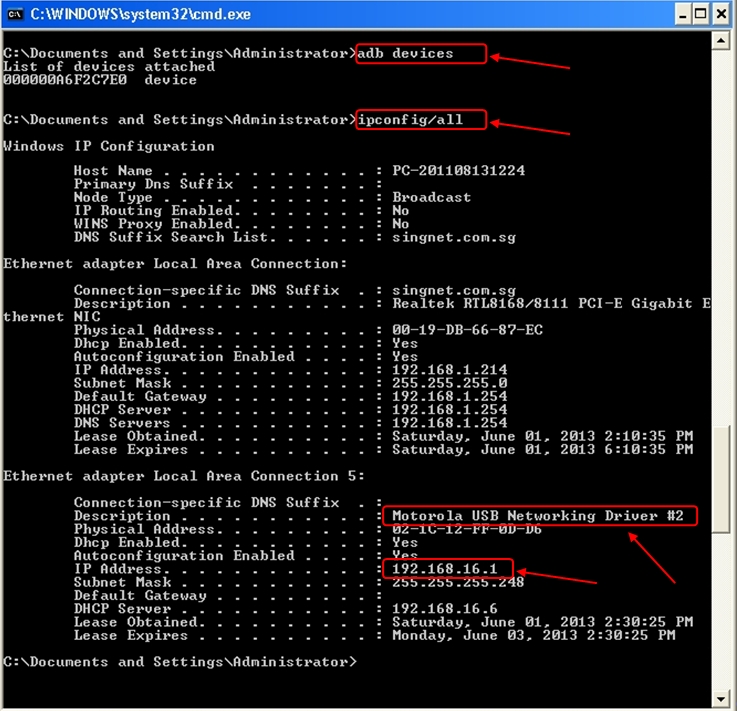
PHOTO: Network adapter named "Motorola USB Networking Driver" with IP address 192.168.16.1
To find out which COM Port to create, at the PC:
Press WIN button + R > Run command: sysdm.cpl > System properties > Hardware Tab > Device Manager > Ports (Com and LPT) > Motorola USB Diagnostic Port (COM9)
COM9 is the port to create for the communication. This port number is different for different connections.

PHOTO: The Motorola Mobile Phone connected to the USB is detected by the device manager as COM9.
https://blogger.googleusercontent.com/img/b/R29vZ2xl/AVvXsEiArcukWY1YFJcvMfmPDQLYxEC7fL5YF0Sl-4IYqPV3d_GS2EjLRjkhwqDV3urUnkbPlRUkqaFsm3ZpTlku3Hvam-40GqAr7HylYrkVaEV_qBCRUBBlamhSTemlPyLUNxKcFUrkjSTTHRS8/s1600/Device+Manager+Shows+Motorola+USB+Diagnostic+Port+%28COM9%29.jpg
With the networking driver installed, launch the HW Virtual Serial Port 2.5.10 application and fill in the following:
IP address: 192.168.16.2 (IP Address of Motorola Phone Portal)
Port: 11004
Port Name: COM9 (Obtained from the [Ports (Com and LPT) of Device Manager]
Server Port: 23
Activate the “Create COM” button to start creating the virtual serial port.

PHOTO: HW Virtual Serial Port 2.5.10 and the required information entered before creating the Virtual COM.
https://blogger.googleusercontent.com/img/b/R29vZ2xl/AVvXsEiHLbTJdygrKhUku_3_Eh_cEU8BLeO7zpYd4f2hOnPv4fR1G6uI4qFr6QS51NB2WK4DkjjWyhvloWUMkPTSpTrxBLym9a5uFs86x04LPak1MbxljeDjQ4D7lyXF7g4VruY1ejN_x8UCXHud/s1600/HW+Virtual+Serial+Port+2.5.10+-+Pre+Opening+HyperTerminal+-+1.jpg
HW Virtual Serial Port 2.5.10, checks the ADB (Android Debug Bridge) device, which in this case is the Motorola Mobile Phone, by sending a test ping to IP address 192.168.16.2. Upon successfully finding the Mobile Phone, it creates the Virtual serial port COM9 and connects it to the PC.
PHOTO: HW Virtual Serial Port 2.5.10, Checks, Creates, and Connects COM9 to the PC.
https://blogger.googleusercontent.com/img/b/R29vZ2xl/AVvXsEiQzd1fucrvVLOEthGxTaEO_w_3p7nAGTEd9gKyoLHYcUt48b2TdM-nmBNS4UklcstrJoqRQ3m9RH1fpcESF7wZEd7E9NaYPCzySxdPEZdNtVQdQbM21wb8R0xGhRigFJIh-JZ0R7t6aLfp/s1600/HW+Virtual+Serial+Port+2.5.10+-+creates+the+Virtual+COM.jpg
Launch the Microsoft application ”HyperTerminal” located in the Accessories Menu.
Start Menu > All Program > Accessories > Communications > HyperTerminal.

PHOTO: ”HyperTerminal” is located in the Accessories Menu
https://blogger.googleusercontent.com/img/b/R29vZ2xl/AVvXsEiylKd9rz5_h2Y7czfhnIUMmPoPKOZPSNg53_PogOocEi1TZZvSIQ5xBqW6CQEINjE9zk4kRUbizwwh2ssc9fLSf31ahofzIIFlzXl5e8yOTMHP-8gazjw_onrjLUFjanHxSzfgzLae-cOB/s1600/Where+to+find+HyperTerminal+in+Windows+XP-1.jpg
When HyperTerminal is launched, a name for the new connection is needed. Just enter any name, for example, “123”. Activate the “OK” button.
https://blogger.googleusercontent.com/img/b/R29vZ2xl/AVvXsEiQzd1fucrvVLOEthGxTaEO_w_3p7nAGTEd9gKyoLHYcUt48b2TdM-nmBNS4UklcstrJoqRQ3m9RH1fpcESF7wZEd7E9NaYPCzySxdPEZdNtVQdQbM21wb8R0xGhRigFJIh-JZ0R7t6aLfp/s1600/HW+Virtual+Serial+Port+2.5.10+-+creates+the+Virtual+COM.jpg
Launch the Microsoft application ”HyperTerminal” located in the Accessories Menu.
Start Menu > All Program > Accessories > Communications > HyperTerminal.
PHOTO: ”HyperTerminal” is located in the Accessories Menu
https://blogger.googleusercontent.com/img/b/R29vZ2xl/AVvXsEiylKd9rz5_h2Y7czfhnIUMmPoPKOZPSNg53_PogOocEi1TZZvSIQ5xBqW6CQEINjE9zk4kRUbizwwh2ssc9fLSf31ahofzIIFlzXl5e8yOTMHP-8gazjw_onrjLUFjanHxSzfgzLae-cOB/s1600/Where+to+find+HyperTerminal+in+Windows+XP-1.jpg
When HyperTerminal is launched, a name for the new connection is needed. Just enter any name, for example, “123”. Activate the “OK” button.
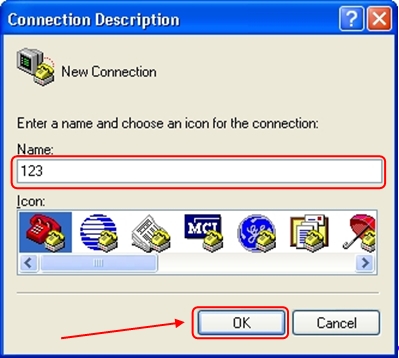
PHOTO: Enter a name for the connection, for example, “123” and press “OK”.
https://blogger.googleusercontent.com/img/b/R29vZ2xl/AVvXsEjTIUJV0NR7KiV2TUf5NQENAFSPVGrDwfKUP2APklsHBX6byI5iWO01zd552uvxsFbXj61kIJPBfo_k1xo8_S8xMF4adXgyu2EOEWLCymQeYyKk4ZFGbEurIZMWWOSDiZ2le7aZ3iJjPy9A/s1600/HyperTerminal+-+%27Connection+Description%27.jpg
The Port to connect to is enter next, for example, COM9. Press “OK” to proceed.
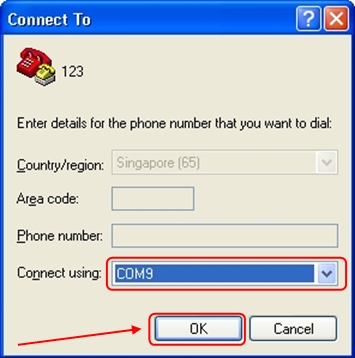
PHOTO: COM9 is the port to connect.
https://blogger.googleusercontent.com/img/b/R29vZ2xl/AVvXsEgSJ1ikcoob0ltGPGCMjvy3gUPbL21e3b-aDy7CzQMbvIpWPZbUI2jPhVub5ewE84Ty_n29UW5m5Cd78a96ToJCjxS-q10AGPGmOuSlfQLSKuSPPQNlKCl76kZkltdg8RkXnznldxQM0PHx/s1600/HyperTerminal+-+%27Connect+To%27.jpg
Select "115200" bits per second, and "None" for Flow Control. Then press “OK” to continue.
PHOTO: Select "115200" bits per second, and "None" for Flow Control before pressing “OK” button.
https://blogger.googleusercontent.com/img/b/R29vZ2xl/AVvXsEhbygmeQ2gA4NcqvfxIKsUdoeQ_yET7zPxZ-E8loE8yol15kyvzEssTfkTJeLi1gqDpFD-ghQzEwaaOm9Qr9qhdD1B7g1UuqgkQZQY3umdqCgq0GlaHhrqICUmFS87SlZGw_raA-E8P0f8I/s1600/HyperTerminal+-+%27COM+Properties%27.jpg
HyperTerminal Command Pad
https://blogger.googleusercontent.com/img/b/R29vZ2xl/AVvXsEhbygmeQ2gA4NcqvfxIKsUdoeQ_yET7zPxZ-E8loE8yol15kyvzEssTfkTJeLi1gqDpFD-ghQzEwaaOm9Qr9qhdD1B7g1UuqgkQZQY3umdqCgq0GlaHhrqICUmFS87SlZGw_raA-E8P0f8I/s1600/HyperTerminal+-+%27COM+Properties%27.jpg
HyperTerminal Command Pad
The HyperTerminal Command Pad appears. Press the “Enter” key at the keyboard a few times before the "BERBUG>" command prompt appears. Type in the command “phone” and the response from the mobile phone is “PHONE: BERBUG”.
To test the GPS of the iDEN phone (in BERBUG mode), type in the command:
“gps sta 255”
To test the GPS of the iDEN phone (in BERBUG mode), type in the command:
“gps sta 255”
The 1st response could be “Invalid character”. Subsequently the same command will produce a “PASSED”.
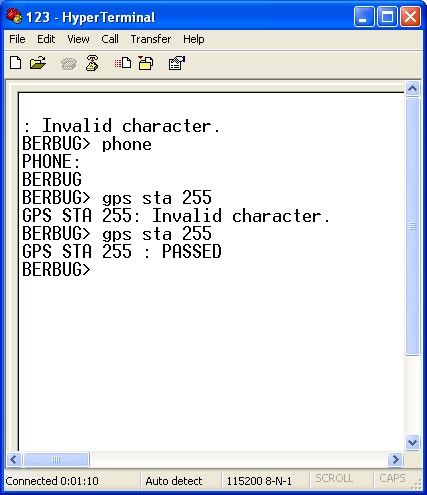
PHOTO: Communication with the mobile phone at the PC using HyperTerminal.
https://blogger.googleusercontent.com/img/b/R29vZ2xl/AVvXsEjpC2BNua-PkTY4jYNC3UptYoFO8TQTbSoPJN12GG9Qkot4s9bp1l2-tFHeUxbR8_kwupxF_t_EVrYLdKhpY5oJlRqsB4O053s65RqwNCApSOfanI_pI10duP-j17EHOzTHQ2FeUGbxMbAv/s1600/HyperTerminal+Communication.jpg

PHOTO: The HW Virtual Serial Port displays the log of messages while communication between the Mobile Phone and the PC is in progress.
https://blogger.googleusercontent.com/img/b/R29vZ2xl/AVvXsEgZ-WarTMpn1gj24cr9h06h8rQ-ZWAkxSeTrMrxcNCjqjMZChd5rw_iVjpvBDKEPOl6Z7xdO_y6peWcjTo8zwWNId78sCQ_CnRX3KDH2FOswHxiu6pPpc8ZeQIMoBnEvGhYP_PgucURmIPk/s1600/HW+Virtual+Serial+Port+2.5.10+with+log+msg.jpg
Sample of the logging:
5/30/2013 5:08:40 PM : Sending test ping to 192.168.16.2 device
5/30/2013 5:08:41 PM : Virtual serial port COM9 created
5/30/2013 5:08:41 PM : Connected device 192.168.16.2
5/30/2013 5:09:28 PM : Keep connection message sent
5/30/2013 5:09:36 PM : Virtual serial port COM9 opened
5/30/2013 5:09:36 PM : Virtual port control options set 8N1
5/30/2013 5:09:36 PM : Write parity to the remote device
5/30/2013 5:09:36 PM : Write stopbits to the remote device
5/30/2013 5:09:36 PM : Write datasize to the remote device
5/30/2013 5:09:36 PM : Virtual port handshake set NONE
5/30/2013 5:09:36 PM : Write handshake to the remote device
5/30/2013 5:09:36 PM : Virtual port baudrate set 115200 Bd
5/30/2013 5:09:36 PM : Write baudrate to the remote device
5/30/2013 5:09:36 PM : Virtual port control options set 8N1
5/30/2013 5:09:36 PM : Write parity to the remote device
5/30/2013 5:09:36 PM : Write stopbits to the remote device
5/30/2013 5:09:36 PM : Write datasize to the remote device
5/30/2013 5:10:15 PM : Keep connection message sent
Reference
- http://jitendrahelp.blogspot.sg/2010/05/hw-vsp3-virtual-serial-port-hw-vsp-is.html
- http://forum.gsmhosting.com/vbb/f770/how-connect-motorola-driod-cdma-work-shop-1610292/ - (How to connect motorola driod with cdma work shop)


 Posts