My Paper, Tuesday, July 16, 2013, Page A15, My Executive, Technology, Advance
From http://epaper.mypaper.sg/emnd/fvxen/fvxp/fvxpress.php?param=2013-07-16
Source Website: http://mypaper.sg/advance/handwrite-notes-these-apps-20130716
By NYT, Published on Jul 16, 2013, mypaper
From http://epaper.mypaper.sg/emnd/fvxen/fvxp/fvxpress.php?param=2013-07-16
Source Website: http://mypaper.sg/advance/handwrite-notes-these-apps-20130716
By NYT, Published on Jul 16, 2013, mypaper

PHOTO: Important tool for cognitive development
In writing by hand, even if it is just printing, our brain must:
In writing by hand, even if it is just printing, our brain must:
- Locate each stroke relative to other strokes.
- Learn and remember appropriate size, slant of global form, and feature detail characteristic of each letter.
- Develop categorization skills.
Research highlights the hand's unique relationship with the brain when it comes to composing thoughts and ideas.
Posted by Dr. Bill, "Memory Medic" on Wednesday, March 13, 2013, at 3:45 PM
The benefits to brain development are similar to what you get with learning to play a musical instrument. Not everybody can afford music lessons, but everybody has access to pencil and paper, and presently, taking handwritten notes, on a digital tablet.
https://blogger.googleusercontent.com/img/b/R29vZ2xl/AVvXsEjulaB6ZH5xEm1cGJR5aukdqYOsKzOKb_M3keLkPB8R4GmXRWHZO46vlaVpiqRzzi8wMogR40G8LkqYbxK_V5A-BfO2QD0QWRmnISbRp3_L2qzqVpEk8QV3UtNsGSHHvylc23Nu2ZaPzRo_/s1600/handwriting.JPG
https://blogger.googleusercontent.com/img/b/R29vZ2xl/AVvXsEjDzU9XKUbJTcIaTnJ8X3KHCyQyvTWHGOjOnfInMJgtsEW_-gFAAs7ejBoSWVTr4mAKM3WSlGM8OPxLLhf3ax7r1c2LA810dFidAabjIGhMh2qlHudH787DeqFMCrs9tmxhbvnvmP5e37U/s1600/handwriting.JPG
http://thankyoubrain.blogspot.sg/2013/03/cursive-writing-makes-kids-smarter.html
STUDENTS and professionals have moved beyond pen and paper when it comes to note-taking.
But taking handwritten notes, even on a digital tablet, is much more personal than typing on a word processor.
Many of today's most popular tablets are finger-friendly. But for a host of note-taking apps, the devices work best when paired with a stylus.
Here are a few faves (favourites):
Posted by Dr. Bill, "Memory Medic" on Wednesday, March 13, 2013, at 3:45 PM
The benefits to brain development are similar to what you get with learning to play a musical instrument. Not everybody can afford music lessons, but everybody has access to pencil and paper, and presently, taking handwritten notes, on a digital tablet.
https://blogger.googleusercontent.com/img/b/R29vZ2xl/AVvXsEjulaB6ZH5xEm1cGJR5aukdqYOsKzOKb_M3keLkPB8R4GmXRWHZO46vlaVpiqRzzi8wMogR40G8LkqYbxK_V5A-BfO2QD0QWRmnISbRp3_L2qzqVpEk8QV3UtNsGSHHvylc23Nu2ZaPzRo_/s1600/handwriting.JPG
https://blogger.googleusercontent.com/img/b/R29vZ2xl/AVvXsEjDzU9XKUbJTcIaTnJ8X3KHCyQyvTWHGOjOnfInMJgtsEW_-gFAAs7ejBoSWVTr4mAKM3WSlGM8OPxLLhf3ax7r1c2LA810dFidAabjIGhMh2qlHudH787DeqFMCrs9tmxhbvnvmP5e37U/s1600/handwriting.JPG
http://thankyoubrain.blogspot.sg/2013/03/cursive-writing-makes-kids-smarter.html
STUDENTS and professionals have moved beyond pen and paper when it comes to note-taking.
But taking handwritten notes, even on a digital tablet, is much more personal than typing on a word processor.
Many of today's most popular tablets are finger-friendly. But for a host of note-taking apps, the devices work best when paired with a stylus.
Here are a few faves (favourites):

PHOTO: Noteshelf – Handwriting on the iPad
https://blogger.googleusercontent.com/img/b/R29vZ2xl/AVvXsEjlhEpckkwJruMSI_Hc4P0jvd8ovfrD5BF51Z7W7JUYX3PurEOvqJKxFLul9XGxCp6eRRhe8VeLctYEIybUTJWs7DSwRNgKtGly4RlCss6AQ7VqKjRpiuAzHfw5R4VF59w1MswkIzhi3suI/s1600/9.png
http://appsontap.files.wordpress.com/2012/06/9.png
http://appsontap.wordpress.com/2012/06/14/noteshelf-handwriting-on-the-ipad/
https://blogger.googleusercontent.com/img/b/R29vZ2xl/AVvXsEjlhEpckkwJruMSI_Hc4P0jvd8ovfrD5BF51Z7W7JUYX3PurEOvqJKxFLul9XGxCp6eRRhe8VeLctYEIybUTJWs7DSwRNgKtGly4RlCss6AQ7VqKjRpiuAzHfw5R4VF59w1MswkIzhi3suI/s1600/9.png
http://appsontap.files.wordpress.com/2012/06/9.png
http://appsontap.wordpress.com/2012/06/14/noteshelf-handwriting-on-the-ipad/
NOTESHELF (US$6, or S$7.60)
The iPad app by Ramki has a main interface that looks like an empty page ready for you to write on, with controls in an icon bar at the top of the screen.
You can choose from many predefined types of digital paper, like plain and ruled pages (lined paper pages), and even one designed for musical notation.
Noteshelf supports digital styluses that connect to the app and relay information, like how hard you're pressing on the screen, to produce light or heavy lines. The highlighter pen and eraser options are slick, and there is a great system for selecting lines, drawings or text so you can adjust them later.
You can add photos to your pages, using intuitive multitouch gestures to move and resize images. But switching from a stylus to finger controls is a little jarring. Your notes can be shared as images or PDFs over e-mail, Twitter or Facebook.

PHOTO: Papyrus - Natural Note Taking
Papyrus is a natural handwriting note-taking app that you use just like paper, but with the flexibility and advantages of modern technology.
Papyrus allows you to take handwritten notes on your Android device using either an active pen (e.g. Samsung S Pen), passive stylus, or your finger. The vector graphics engine keeps your notes beautiful at any zoom level and on any device, while the simple and intuitive user interface allows you to take notes quickly and efficiently.
By Steadfast Innovation, LLC - July 28, 2013 (Productivity)
https://blogger.googleusercontent.com/img/b/R29vZ2xl/AVvXsEgpCy-2ussNbOTJ1DRO1q7tLxrT4yYeNZf-fj5NqZO4mrZ_6_HBrmoD7sJipFSAttnSWRyH_PfG-0kCd5yAzHslZZfU-Tp6hPz7MrMfhZxAC9hjyrMtQ62eJINeLxlo61RxztuZj8ozzD68/s1600/unnamed.png
https://lh3.ggpht.com/zk7VXw9STeur0cUBrAvjhxOiR5urVuUl5v9Oc0yyzfxwAYyQaEJX1_d171egLlcdjQY=h900
https://play.google.com/store/apps/details?id=com.steadfastinnovation.android.projectpapyrus
Papyrus is a natural handwriting note-taking app that you use just like paper, but with the flexibility and advantages of modern technology.
Papyrus allows you to take handwritten notes on your Android device using either an active pen (e.g. Samsung S Pen), passive stylus, or your finger. The vector graphics engine keeps your notes beautiful at any zoom level and on any device, while the simple and intuitive user interface allows you to take notes quickly and efficiently.
By Steadfast Innovation, LLC - July 28, 2013 (Productivity)
https://blogger.googleusercontent.com/img/b/R29vZ2xl/AVvXsEgpCy-2ussNbOTJ1DRO1q7tLxrT4yYeNZf-fj5NqZO4mrZ_6_HBrmoD7sJipFSAttnSWRyH_PfG-0kCd5yAzHslZZfU-Tp6hPz7MrMfhZxAC9hjyrMtQ62eJINeLxlo61RxztuZj8ozzD68/s1600/unnamed.png
https://lh3.ggpht.com/zk7VXw9STeur0cUBrAvjhxOiR5urVuUl5v9Oc0yyzfxwAYyQaEJX1_d171egLlcdjQY=h900
https://play.google.com/store/apps/details?id=com.steadfastinnovation.android.projectpapyrus
PAPYRUS NATURAL NOTE TAKING (FREE)
Visually, the Android app is a lot like Noteshelf, with a page of simulated paper to write on and a slim menu bar at the top. It also has many of the same features.
The similarity to writing on paper is enhanced by a feature that makes thicker or thinner lines depending on how hard you push the stylus on the screen.
The app has different paper backgrounds, and you can add images. Adding typed text to your notes and drawing geometric shapes require an in-app purchase.

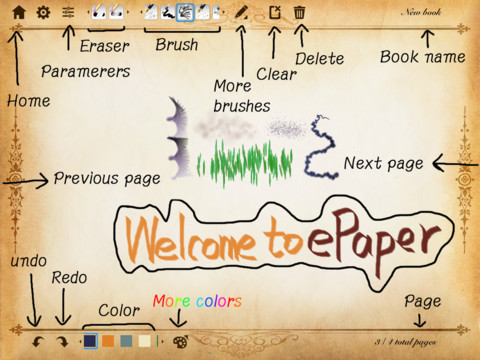
PHOTO: ePaper - Sketch, Write, Draw, Outline and color on a Digital Paper Notebook
ePaper, a sketching app, is the easiest paperless communications tool for EVERYTHING - Planning, storyboarding, problem solving and letting you share your ideas visually anywhere, anytime.
By effectmatrix
https://blogger.googleusercontent.com/img/b/R29vZ2xl/AVvXsEhyS8DuY0IePdRkHmJC1UGZ3eQGpKGi2jHJD5nnj-oiqbeY_8ULVeBAgfvmT7Nu6C-2IwcCugS__hsDDPSk4zMjxJYKyV0VmKnssAJ6Vg5b3BEandvbxpqdN9jeq-E3uU_BkmPV5nt5USy0/s1600/mzl.awasqolu.1024x1024-65.jpg
http://www.effectmatrix.com/mac-appstore/epaper1.jpg
http://www.effectmatrix.com/mac-appstore/ePaper.htm
ePAPER (US$2)
Made for iOS, the ePaper app by Effectmatrix has a more open design and departs from the idea of simulating a notepad. It has tools that let you sketch and paint on your note pages.
A broad array of pen, pencil and brush-emulating tools is included. A pack of additional paper designs costs US$1. It's easy to use, and if your notes tend to be artistic and free-form, this is for you.

ePaper, a sketching app, is the easiest paperless communications tool for EVERYTHING - Planning, storyboarding, problem solving and letting you share your ideas visually anywhere, anytime.
By effectmatrix
https://blogger.googleusercontent.com/img/b/R29vZ2xl/AVvXsEhyS8DuY0IePdRkHmJC1UGZ3eQGpKGi2jHJD5nnj-oiqbeY_8ULVeBAgfvmT7Nu6C-2IwcCugS__hsDDPSk4zMjxJYKyV0VmKnssAJ6Vg5b3BEandvbxpqdN9jeq-E3uU_BkmPV5nt5USy0/s1600/mzl.awasqolu.1024x1024-65.jpg
http://www.effectmatrix.com/mac-appstore/epaper1.jpg
http://www.effectmatrix.com/mac-appstore/ePaper.htm
ePAPER (US$2)
Made for iOS, the ePaper app by Effectmatrix has a more open design and departs from the idea of simulating a notepad. It has tools that let you sketch and paint on your note pages.
A broad array of pen, pencil and brush-emulating tools is included. A pack of additional paper designs costs US$1. It's easy to use, and if your notes tend to be artistic and free-form, this is for you.
PHOTO: Write by Stylus Labs
Write is a note-taking app developed by Stylus Labs. Write provides users with a set of tools to draw, erase, insert space, and add bookmarks. Create handwritten links to websites, customize and save pens, and insert images into documents. Write is a perfect app for note-taking and brainstorming.
https://blogger.googleusercontent.com/img/b/R29vZ2xl/AVvXsEhG0_g_yd4bYtj7I9-OayVlkNsOL1u6f5Idacq6rM_IBxkHBZHnHHxdWkZ9HNOJF1ppHlDHrVVz-7wIflR1ketzTlBHsEHktDp9BtishIUEGIlLpEGhyphenhyphenjttL05Vq8mKvfYCL_B3osxn1NNU/s1600/best-note-taking-apps-for-android-write-by-stylus.jpg
http://media.heavy.com/media/2013/08/best-note-taking-apps-for-android-write-by-stylus.jpg
http://www.heavy.com/tech/2013/08/top-best-note-taking-apps-for-android-phones-and-tablets-2013/
WRITE (FREE)
On Android, this app by Stylus Labs is a simpler offering, with fewer pen types and digital paper designs. But it's still powerful, and you can export notes as images or PDFs via services like e-mail or Dropbox.
It can also support electronic styluses. The pages automatically scroll (move up the displayed portion in window) up to expose more blank space when you approach the bottom edge.
By NYT, Published on Jul 16, 2013, mypaper
HELPDESK
我的字典: Wǒ de zì diǎn
Note-taking: 作笔记 zuò bǐ jì
Ruled pages (lined paper pages): 直纹页 zhí wén yè
Geometric shapes: 几何行状 jǐ hé xíng zhuàng
Scroll (move up the displayed portion in window): 滚动 gǔn dòng
Reference
Write is a note-taking app developed by Stylus Labs. Write provides users with a set of tools to draw, erase, insert space, and add bookmarks. Create handwritten links to websites, customize and save pens, and insert images into documents. Write is a perfect app for note-taking and brainstorming.
https://blogger.googleusercontent.com/img/b/R29vZ2xl/AVvXsEhG0_g_yd4bYtj7I9-OayVlkNsOL1u6f5Idacq6rM_IBxkHBZHnHHxdWkZ9HNOJF1ppHlDHrVVz-7wIflR1ketzTlBHsEHktDp9BtishIUEGIlLpEGhyphenhyphenjttL05Vq8mKvfYCL_B3osxn1NNU/s1600/best-note-taking-apps-for-android-write-by-stylus.jpg
http://media.heavy.com/media/2013/08/best-note-taking-apps-for-android-write-by-stylus.jpg
http://www.heavy.com/tech/2013/08/top-best-note-taking-apps-for-android-phones-and-tablets-2013/
WRITE (FREE)
On Android, this app by Stylus Labs is a simpler offering, with fewer pen types and digital paper designs. But it's still powerful, and you can export notes as images or PDFs via services like e-mail or Dropbox.
It can also support electronic styluses. The pages automatically scroll (move up the displayed portion in window) up to expose more blank space when you approach the bottom edge.
By NYT, Published on Jul 16, 2013, mypaper
HELPDESK
我的字典: Wǒ de zì diǎn
Note-taking: 作笔记 zuò bǐ jì
Ruled pages (lined paper pages): 直纹页 zhí wén yè
Geometric shapes: 几何行状 jǐ hé xíng zhuàng
Scroll (move up the displayed portion in window): 滚动 gǔn dòng
Reference
- My Paper, Tuesday, July 16, 2013, Page A15, My Executive, Technology, Advance
- http://epaper.mypaper.sg/emnd/fvxen/fvxp/fvxpress.php?param=2013-07-16
- http://mypaper.sg/advance/handwrite-notes-these-apps-20130716
- https://blogger.googleusercontent.com/img/b/R29vZ2xl/AVvXsEjulaB6ZH5xEm1cGJR5aukdqYOsKzOKb_M3keLkPB8R4GmXRWHZO46vlaVpiqRzzi8wMogR40G8LkqYbxK_V5A-BfO2QD0QWRmnISbRp3_L2qzqVpEk8QV3UtNsGSHHvylc23Nu2ZaPzRo_/s1600/handwriting.JPG
- https://blogger.googleusercontent.com/img/b/R29vZ2xl/AVvXsEjDzU9XKUbJTcIaTnJ8X3KHCyQyvTWHGOjOnfInMJgtsEW_-gFAAs7ejBoSWVTr4mAKM3WSlGM8OPxLLhf3ax7r1c2LA810dFidAabjIGhMh2qlHudH787DeqFMCrs9tmxhbvnvmP5e37U/s1600/handwriting.JPG
- http://thankyoubrain.blogspot.sg/2013/03/cursive-writing-makes-kids-smarter.html
- https://blogger.googleusercontent.com/img/b/R29vZ2xl/AVvXsEjlhEpckkwJruMSI_Hc4P0jvd8ovfrD5BF51Z7W7JUYX3PurEOvqJKxFLul9XGxCp6eRRhe8VeLctYEIybUTJWs7DSwRNgKtGly4RlCss6AQ7VqKjRpiuAzHfw5R4VF59w1MswkIzhi3suI/s1600/9.png
- http://appsontap.files.wordpress.com/2012/06/9.png
- http://appsontap.wordpress.com/2012/06/14/noteshelf-handwriting-on-the-ipad/
- https://blogger.googleusercontent.com/img/b/R29vZ2xl/AVvXsEgpCy-2ussNbOTJ1DRO1q7tLxrT4yYeNZf-fj5NqZO4mrZ_6_HBrmoD7sJipFSAttnSWRyH_PfG-0kCd5yAzHslZZfU-Tp6hPz7MrMfhZxAC9hjyrMtQ62eJINeLxlo61RxztuZj8ozzD68/s1600/unnamed.png
- https://lh3.ggpht.com/zk7VXw9STeur0cUBrAvjhxOiR5urVuUl5v9Oc0yyzfxwAYyQaEJX1_d171egLlcdjQY=h900
- https://play.google.com/store/apps/details?id=com.steadfastinnovation.android.projectpapyrus
- https://blogger.googleusercontent.com/img/b/R29vZ2xl/AVvXsEhyS8DuY0IePdRkHmJC1UGZ3eQGpKGi2jHJD5nnj-oiqbeY_8ULVeBAgfvmT7Nu6C-2IwcCugS__hsDDPSk4zMjxJYKyV0VmKnssAJ6Vg5b3BEandvbxpqdN9jeq-E3uU_BkmPV5nt5USy0/s1600/mzl.awasqolu.1024x1024-65.jpg
- http://www.effectmatrix.com/mac-appstore/epaper1.jpg
- http://www.effectmatrix.com/mac-appstore/ePaper.htm
- https://blogger.googleusercontent.com/img/b/R29vZ2xl/AVvXsEhG0_g_yd4bYtj7I9-OayVlkNsOL1u6f5Idacq6rM_IBxkHBZHnHHxdWkZ9HNOJF1ppHlDHrVVz-7wIflR1ketzTlBHsEHktDp9BtishIUEGIlLpEGhyphenhyphenjttL05Vq8mKvfYCL_B3osxn1NNU/s1600/best-note-taking-apps-for-android-write-by-stylus.jpg
- http://media.heavy.com/media/2013/08/best-note-taking-apps-for-android-write-by-stylus.jpg
- http://www.heavy.com/tech/2013/08/top-best-note-taking-apps-for-android-phones-and-tablets-2013/


 Posts
Posts
















.jpg)
.gif)